Nutrixe
The iPhone and Android app
The scanner and the map, in a coeliac's pocket
Scan a barcode: Nutrixe tells you what the ingredient list lets you conclude — and what it doesn't. The 3,274 verified places of the directory are in the same app. Free, no account, no ads.
 Scan to install on your phone

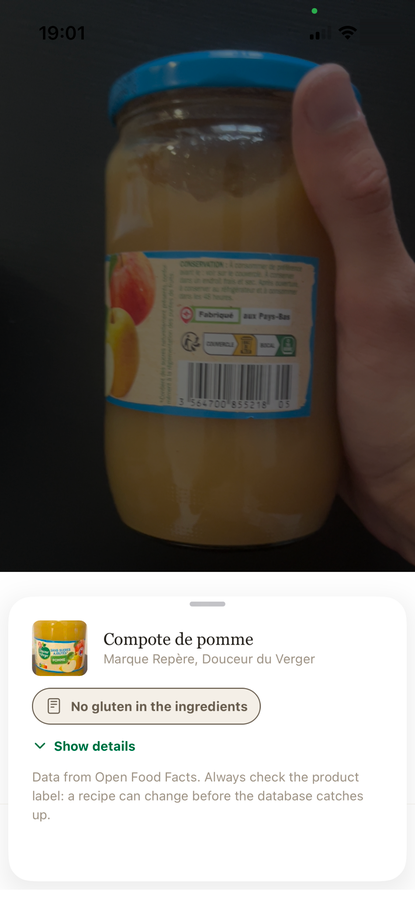
The scanner
A verdict, not a promise
The app reads the ingredient list — from Open Food Facts, the open database maintained by its users — and reads it again the way a coeliac would: wheat, barley, rye and their derivatives, starch of unspecified origin, oats outside a certified supply chain, "may contain" statements.
The result is never "gluten-free ✅". It is what the list contains, what it leaves uncertain, and the sentence that always comes back: the manufacturer can change the recipe, check the label. Unknown product? The app says so, and offers to send the label rather than make something up.
The map
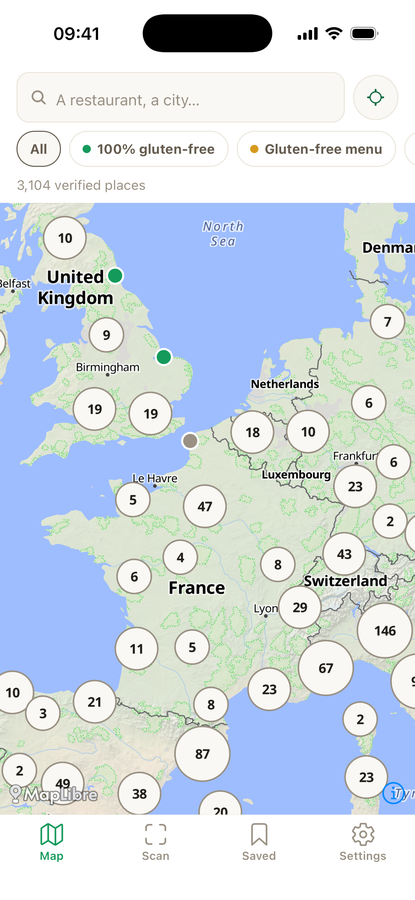
3,274 places, verified one by one
Restaurants, bakeries, pastry shops and stores in 16 countries, each put through the same method: cross-checked sources, actual level rather than claimed, risks flagged, date shown. 89% are fully dedicated kitchens; the others are classed "gluten-free menu" or "options", and the listing tells you which.
The "strict coeliac" filter hides everything that isn't dedicated in one tap. Around you, or in the city you're travelling to.

Free, and what premium adds
The essentials are free, with no account and no ads
Free, unlimited
- The scanner and its verdict
- The map and the 3,274 listings
- Six languages
- No account, no tracking: everything stays on your phone
Premium
- The offline map, for travelling without signal
- Travel lists
- The notebook: scan history and favourites
- Dark and automatic themes
The notebook
What you scanned, what you liked
Scan history and favourites in one place. A product reopened from the history shows instantly, then is re-read in the background: if the recipe changed since your scan, the app warns you instead of silently replacing the old verdict.
Six languages, one stance: never say "it's gluten-free" — say what we know, where it comes from, and what remains at risk. Why this nuance matters, especially for oats.
Frequently asked questions
What exactly does the scanner do?
It reads the barcode, fetches the product's ingredient list from Open Food Facts and reads it again the way a coeliac would: wheat, barley, rye and their derivatives, starch of unspecified origin, oats outside a certified supply chain, "may contain" statements. Every suspect mention is named, with the reason.
Is the verdict reliable?
It is honest: it never says "gluten-free ✅", it says what the list contains, what it leaves uncertain, and reminds you that the manufacturer can change the recipe. Open Food Facts is maintained by its users; an unknown product is reported as such, and the app offers to send the label rather than make something up.
Does the app work offline?
The scanner needs a connection to query the database. The offline map is part of premium: the 3,274 places download to the phone before a trip, to be browsed with no signal and no roaming.
What does premium include?
The offline map, travel lists, the notebook that keeps scan history and favourites, and dark and automatic themes. The price is shown in the app, in your store's currency, with a free trial.
Is it available on Android?
Yes, on Google Play, with the same features as on iPhone. The QR code on the website opens the right store for whichever phone scans it.
What happens to my data?
It stays on your phone: no account, no advertising identifier, no resale. The only outgoing requests are the scan to Open Food Facts, the map to our servers, and anonymous, cookie-free audience measurement. A photo is only sent if you report a product.
Install Nutrixe on your phone
Scan the code from your phone, or open the App Store or Google Play.